Accounts Merge — Coding Interview Walkthrough
You’re in a coding interview. The interviewer says: “Given a list of accounts, each with a name and a list of emails, merge accounts that share at least one email.” The key is recognizing this as a Union-Find (or DFS/BFS graph connectivity) problem. Emails are nodes; accounts link the emails in each account. This is LeetCode #721, a graph problem disguised as a data-processing question.
This walkthrough covers how to model the problem as a graph, implement Union-Find with path compression, and reconstruct the merged results.
The Problem
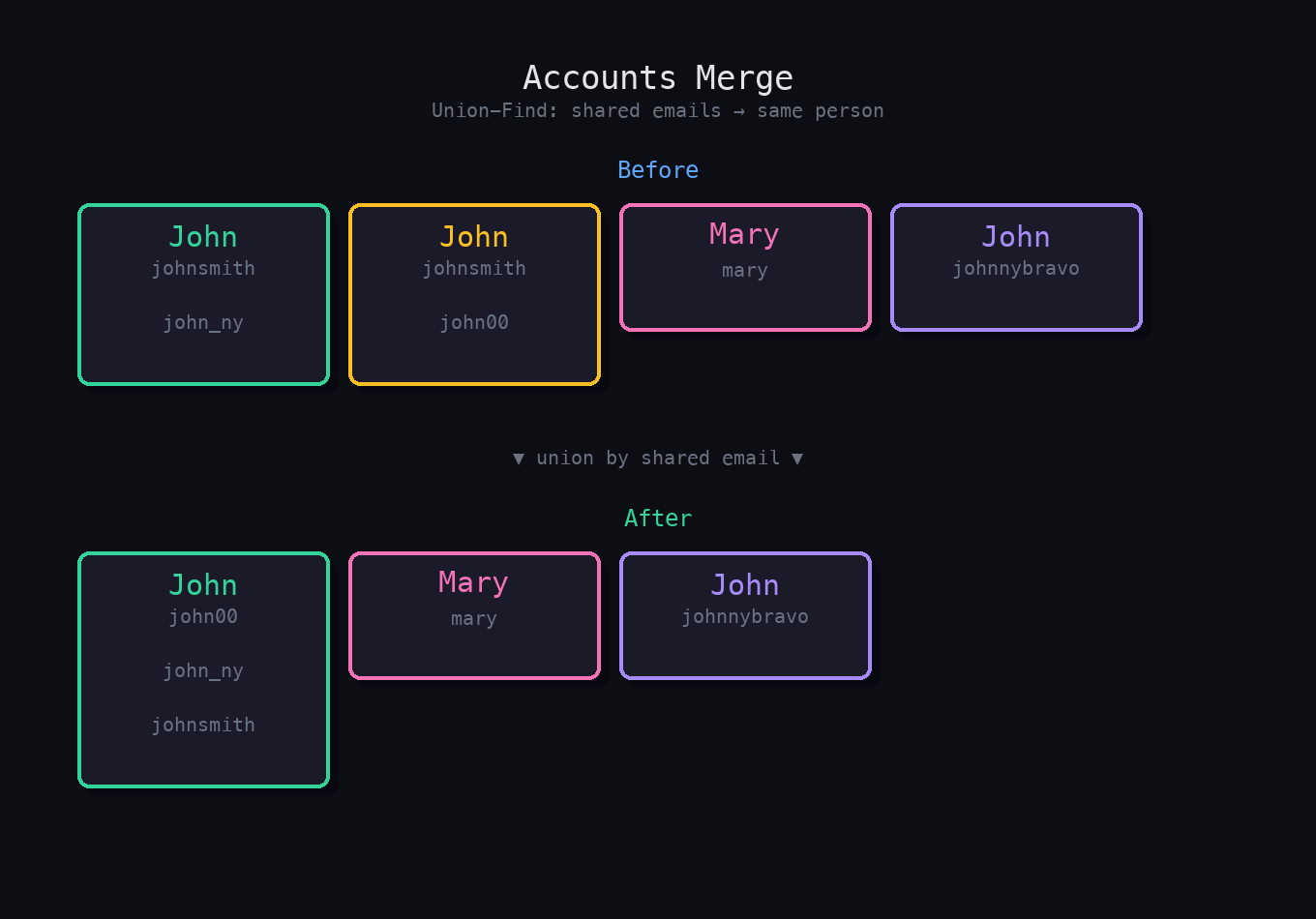
Given a list of accounts where accounts[i][0] is the account name and accounts[i][1:] are email addresses, merge accounts that share at least one email. After merging, return the accounts with emails sorted alphabetically within each account. Two accounts belong to the same person if they share any email. (LeetCode #721)
Example
Input
accounts = [
  ["John", "johnsmith@mail.com", "john_newyork@mail.com"],
  ["John", "johnsmith@mail.com", "john00@mail.com"],
  ["Mary", "mary@mail.com"],
  ["John", "johnnybravo@mail.com"]
]
Output
[
  ["John", "john00@mail.com", "john_newyork@mail.com", "johnsmith@mail.com"],
  ["Mary", "mary@mail.com"],
  ["John", "johnnybravo@mail.com"]
]
Already comfortable with the solution? Practice it in a mock interview →
What Interviewers Are Actually Testing
| Skill | What Interviewers Observe |
|---|---|
| Graph modeling | Do you see emails as nodes and shared accounts as edges? |
| Union-Find or DFS | Can you implement either approach? |
| Data structure setup | Do you map emails to account indices or union emails directly? |
| Reconstruction | Do you collect all emails per component and sort them? |
| Name recovery | Do you recover the account name at the end, not during merging? |
Step 1: Clarifying Questions
1. Can two accounts have the same name but be different people? Yes. Same name does not mean same person. Only shared emails determine identity.
2. Can the same email appear more than twice? Technically yes, and it still correctly merges all those accounts into one.
3. Do we need to preserve the original input order? No, output order does not matter, but emails within each merged account must be sorted.
Step 2: The Key Insight
Model this as a graph problem: each email is a node. Within each account, connect all emails together (they belong to the same person). Then find all connected components. Each component is one merged account. The name comes from any account that originally contained an email in that component (they all share the same name by the merging logic).
Step 3: Algorithm (Union-Find)
- Map each email to a unique index.
- For each account, union all emails in that account together (connect the first email to every other email in the account).
- Also map each email to its owner name (the account name).
- Group emails by their Union-Find root.
- For each root, sort the emails and prepend the name.
Python Implementation
Union-Find:
from collections import defaultdict

def accountsMerge(accounts: list[list[str]]) -> list[list[str]]:
    parent = {}
    email_to_name = {}

    def find(x):
        if parent[x] != x:
            parent[x] = find(parent[x])  # path compression
        return parent[x]

    def union(x, y):
        root_x, root_y = find(x), find(y)
        if root_x != root_y:
            parent[root_x] = root_y

    # Build union-find
    for account in accounts:
        name = account[0]
        first_email = account[1]
        for email in account[1:]:
            if email not in parent:
                parent[email] = email
            email_to_name[email] = name
            union(first_email, email)

    # Group emails by root
    components = defaultdict(list)
    for email in parent:
        root = find(email)
        components[root].append(email)

    # Build result
    result = []
    for root, emails in components.items():
        result.append([email_to_name[root]] + sorted(emails))

    return result
DFS approach:
from collections import defaultdict

def accountsMerge_dfs(accounts: list[list[str]]) -> list[list[str]]:
    email_to_accounts = defaultdict(list)  # email -> list of account indices

    for i, account in enumerate(accounts):
        for email in account[1:]:
            email_to_accounts[email].append(i)

    visited_accounts = set()
    result = []

    def dfs(account_idx: int, emails: list[str]) -> None:
        if account_idx in visited_accounts:
            return
        visited_accounts.add(account_idx)
        for email in accounts[account_idx][1:]:
            emails.append(email)
            for neighbor_account in email_to_accounts[email]:
                dfs(neighbor_account, emails)

    for i, account in enumerate(accounts):
        if i not in visited_accounts:
            emails = []
            dfs(i, emails)
            result.append([account[0]] + sorted(set(emails)))

    return result
Time and Space Complexity
| Time | Space | |
|---|---|---|
| Union-Find | O(E * α(E)) ≈ O(E) | O(E) |
| DFS | O(E log E) | O(E) |
E = total number of emails across all accounts. The log factor in DFS comes from sorting within each component.
Common Interview Mistakes
-
Merging by name instead of by email. Same name does not mean same person. Only shared emails trigger a merge.
-
Not using path compression in Union-Find. Without it, find operations degrade to O(n). Path compression makes it nearly O(1) amortized.
-
Forgetting to initialize
parent[email] = emailfor every new email before unioning. Without this,findwill throw a key error. -
Duplicating emails. In DFS, an email may be added multiple times (from different account paths visiting the same email). Use
set(emails)when building the result. -
Using account names as keys for components. Different accounts with the same name are different people. Use the root email or account index as the component key.
What a Strong Candidate Sounds Like
“This is a graph connectivity problem. Emails are nodes; each account connects all its emails into a group. I’ll use Union-Find: for each account, I union the first email with every other email in that account. After processing all accounts, I group emails by their Union-Find root and sort each group. I recover the name from any email in the group since they all share the same owner. Time is effectively O(E log E) for the sorting step.”
Example Interview Dialogue
Interviewer: Why can’t you just group accounts by name?
Candidate: Because different people can share the same name. Two “John” accounts might be completely unrelated people. The merge criterion is shared emails, not shared names. The name is just metadata attached to a component after the merge.
Interviewer: What’s the difference between the Union-Find and DFS approaches?
Candidate: Union-Find operates on emails directly: union them as you encounter shared ones, then group by root afterward. DFS operates on account indices: build a graph where two accounts are adjacent if they share an email, then DFS each connected component of accounts. Both are correct. Union-Find is slightly more natural here since emails are the entities being merged.
Related Problems to Practice
- Number of Connected Components in an Undirected Graph (LeetCode #323). Union-Find fundamentals on a graph.
- Redundant Connection (LeetCode #684). Union-Find with cycle detection.
- Graph Valid Tree (LeetCode #261). Union-Find for tree vs. cyclic graph detection.
- Number of Islands (LeetCode #200). DFS/BFS connected components on a grid.
Practice This in a Mock Interview
Accounts Merge is one of the most realistic Union-Find problems. It looks like a data-processing question until you see the graph underneath. The signal interviewers look for is immediate recognition of the email-as-node model and clean Union-Find implementation with path compression.
Start a mock interview for Accounts Merge on Intervu.
Further reading:
- How to Prepare for a Coding Interview in 2026, the complete roadmap and study plans
- Why LeetCode alone isn’t enough, and what to practice instead
- Practice any LeetCode problem as a live mock interview
- The Grind 75 Pathway, a structured study plan with AI practice links
- Browse all walkthroughs on GitHub, condensed solutions with code